Tailor Brands Logo Maker Review 2026: Design Quality, Pricing & SVG Exports
This is a design review of Tailor Brands' logo maker, not a ranking of alternatives. If you already know Tailor Brands isn't right for you, see our Tailor Brands logo maker alternatives guide.
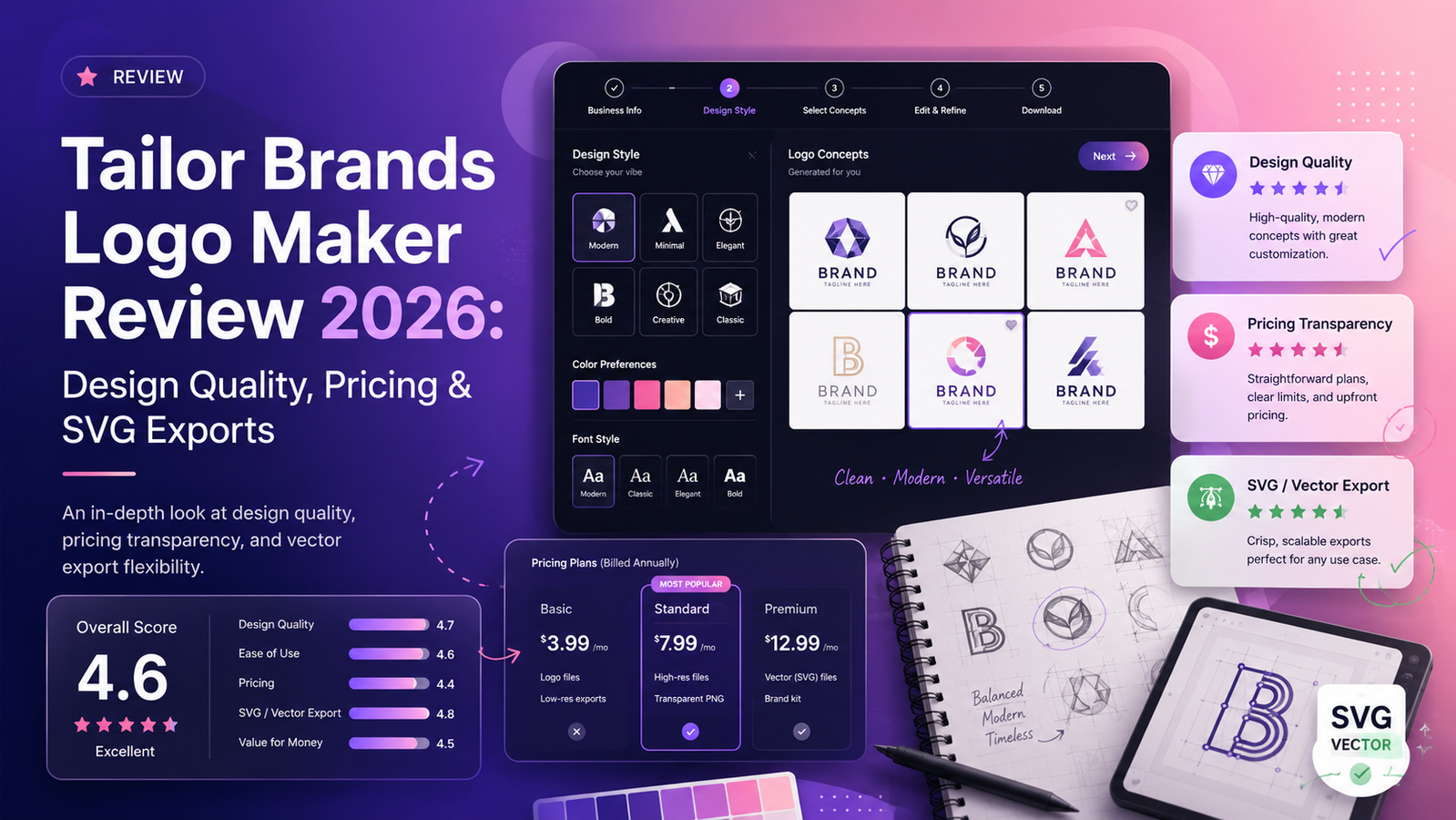
Tested across three sample business types. Evaluated on output quality, workflow UX, editing depth, file formats, and suitability as a standalone logo tool.
This is a design review of Tailor Brands' logo maker, not a ranking of alternatives. If you already know Tailor Brands isn't right for you, see our Tailor Brands logo maker alternatives guide.
Quick Verdict
Tailor Brands has a genuinely smart logo creation workflow. Its standout feature is the "This or That" font tool — it helps non-designers express aesthetic taste through visual font comparisons rather than abstract design vocabulary. For founders who find categories like "modern" or "playful" meaningless, this approach is more accurate than any questionnaire-based alternative we tested.
The limitations are equally real. Independent reviews and our own testing found the editor more constrained than dedicated logo tools — particularly around freeform placement, custom icon creation, and layout control. SVG files are locked behind the mid-tier plan. And the platform's primary focus has shifted considerably — Tailor Brands now positions itself as a full business setup platform, with the logo maker as one of many services.
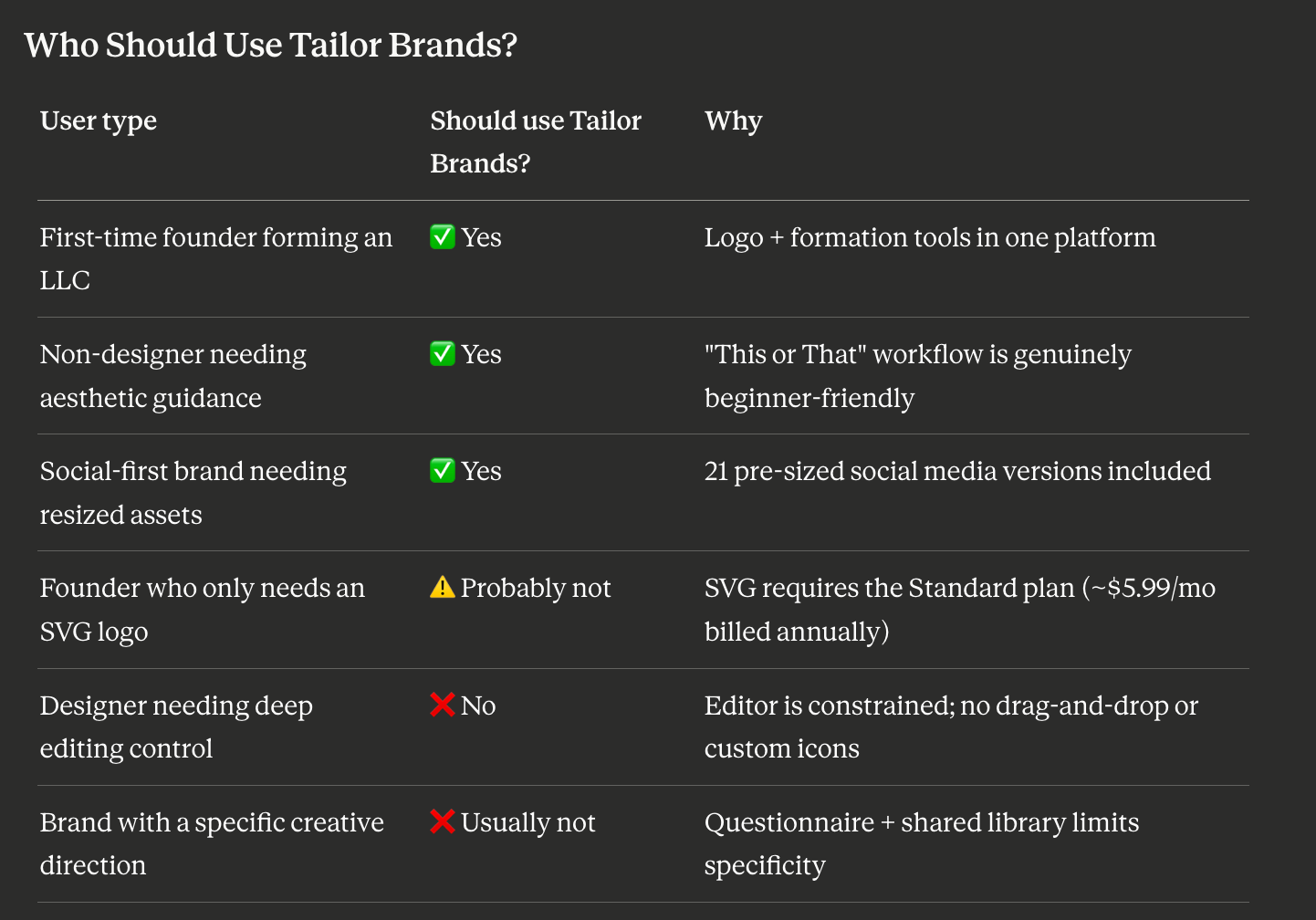
For founders who need a standalone logo tool with deep editing or free SVG, Tailor Brands is not designed for that. For non-designers who want guided aesthetic decisions bundled with business tools, it delivers well.
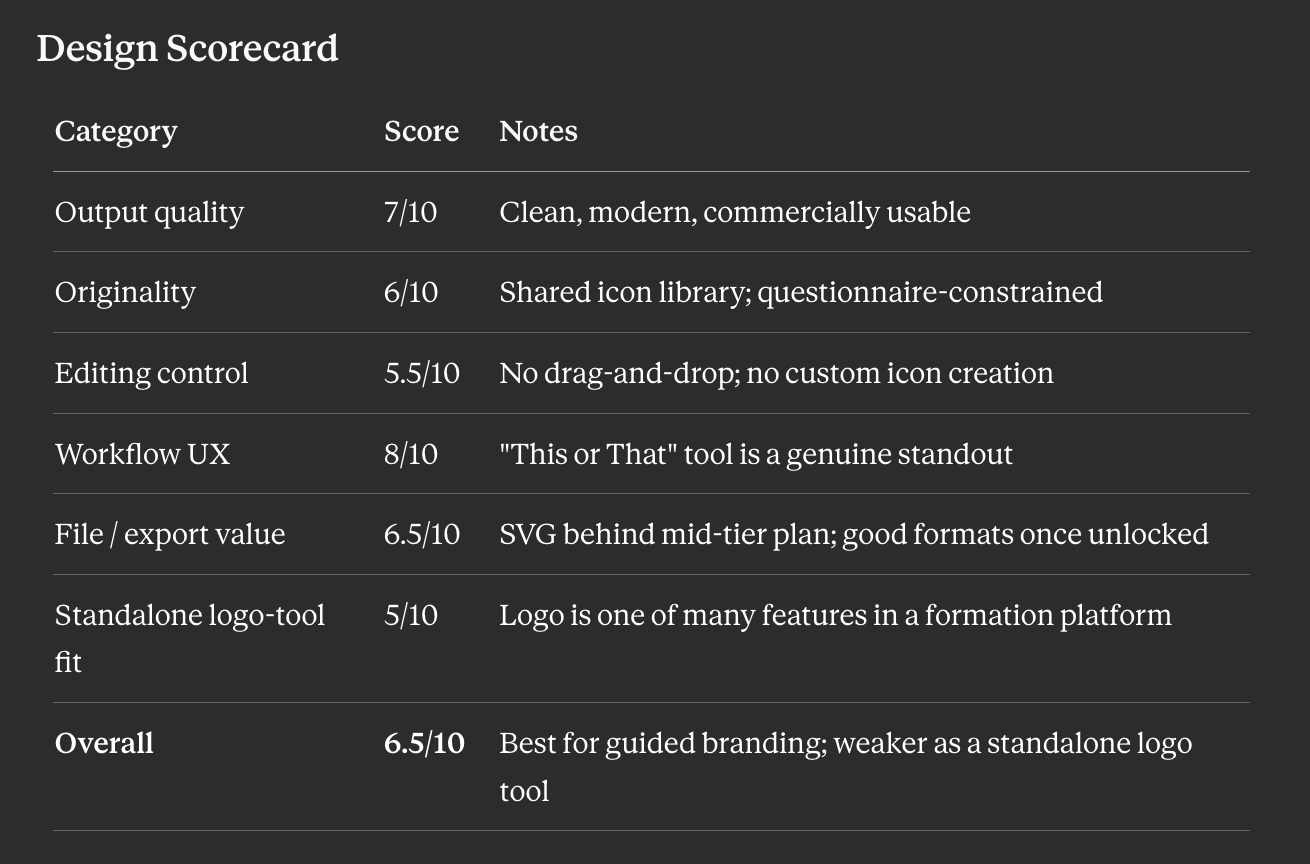
Overall design rating for logo creation: 6.5 / 10
Is Tailor Brands Worth It for Logo Design?
Tailor Brands is worth it if you want a guided logo workflow and may also need business formation tools — LLC filing, registered agent, website builder, and social media tools — in one place. It is less worth it if you only need a logo, want free SVG export, or need deeper editing control and prompt-based generation.
How We Tested Tailor Brands
We created logos for three sample businesses: a B2B SaaS startup, a boutique wellness brand, and a local café. We ran the full workflow from business name input through the "This or That" font preference tool, evaluated first-pass logo concepts, tested the editor's customization range, and reviewed file format availability and pricing at each plan tier. We did not test LLC formation, registered agent, or compliance services — this review evaluates the logo maker specifically.
What Tailor Brands Actually Is (In 2026)
Tailor Brands launched in 2014 as an AI-powered logo maker. It now describes itself as a business setup platform, with services including logo maker, digital business cards, website builder, business insurance, trademark filing, domain registration, business mailbox, and business coaching. According to Tailor Brands, the platform has served more than 30 million business owners globally across 120 countries.
This matters for a design review because platform priorities shape product investment. The logo creation UX is polished — the "This or That" tool is evidence of real design thinking — but the editing depth and AI generation sophistication reflect a platform where logo creation is one of many features rather than the entire product.
This does not make the logo maker worse by default. It changes what it is optimized for. The onboarding experience is excellent. The editing layer is where the constraints show.
For related context on how Tailor Brands compares as a standalone logo platform, see our Looka logo maker review — Looka is the closest dedicated brand-kit alternative without the formation bundling.
Design Output Quality: The Honest Assessment
What the output actually looks like
Tailor Brands' logos are clean and commercially appropriate. The AI consistently produces balanced compositions — font sizes, spacing, and icon-to-wordmark proportion are well-handled across first-pass options. For mainstream business categories — retail, hospitality, professional services, wellness — the output is credible and immediately usable.
As Wbcom Designs' review observes: "The platform generates logos that are clean, modern, and versatile, suitable for use across digital platforms, print materials, and merchandise."
Typography is a relative strength. The "This or That" font selection process produces type pairings that feel more attuned to stated aesthetic preferences than a straightforward category dropdown. Tailor Brands' font mixing by style direction ("Elegant," "Masculine," "Playful") gives the output more tonal range than most questionnaire tools.
Icon quality is acceptable for mainstream categories, but the library-driven model means many icons feel familiar. The output is usually clean, but rarely surprising. As Sonary's user review compilation notes: "more experienced users might find the customization options a bit limited or dismayed by the pre-designed icons." The icons are commercially safe and well-rendered — they just don't offer the distinctiveness of a custom-designed or prompt-generated mark.
Color handling is less flexible than the typography tools. During testing, color selection appeared palette-constrained rather than allowing open hex input. We did not find a clear hex-code input during testing — though platform UIs change and this should be verified directly at tailorbrands.com.
The originality ceiling
SaaSworthy's 2026 analysis flags the core limitation plainly: "Limited customization: lack of advanced editing options for in-depth customization. Some users have reported issues with logo quality and originality."
The structural reason is the shared icon library combined with a questionnaire-constrained brief. The AI's solution space is defined before generation begins — meaning outputs for similar businesses in similar categories will draw from overlapping assets.
The "This or That" Workflow: Tailor Brands' Genuine Design Strength
Tailor Brands' best design feature is its "This or That" font tool: it helps non-designers express taste through visual comparison instead of design vocabulary.
Workflow UX rating: 8/10 — Tailor Brands' strongest design feature.
The full logo creation workflow:
Step 1: Business information. Enter your business name, a short description, and your industry.
Step 2: Logo type selection. Choose between icon-based, wordmark-only, or initial-based — a meaningful design decision surfaced clearly rather than buried.
Step 3: The "This or That" font tool. Two real font examples appear side by side. You choose the one that feels closer to your brand. The process repeats several times. The AI builds a picture of your aesthetic taste from actual visual comparisons — not abstract labels like "clean" or "bold." For non-designers who find design vocabulary confusing, this is significantly more accurate than category-based questionnaires.
Step 4: Logo generation and refinement. Multiple logo options appear. The editor allows font swaps, color adjustments, icon changes from the library, and basic layout modifications.
The friction point: Once inside the advanced editor, you cannot switch back to the automated logo builder without creating a new logo or copying the existing one — a constraint noted by ecomm.design's hands-on review.
Editing Tools: What You Can and Can't Control
We found you can:
- Change fonts from Tailor Brands' library
- Swap icons from the shared icon library
- Adjust colors within palette options
- Modify basic layout proportions
- Preview your logo across 21 social media size formats — a genuine time-saver
- Download in EPS, SVG, and PNG on Standard plan and above
We did not find a clear way to:
- Use drag-and-drop for freeform element placement
- Enter exact hex codes — color selection appeared palette-constrained during testing
- Create or import custom icons from outside Tailor Brands' library
- Access deep vector editing within the platform
- Return to the automated logo builder after switching to advanced editing without starting over
Platform features can change — verify current capabilities directly at tailorbrands.com before making a purchase decision.
The result is not a bad logo maker. It is a logo maker that feels polished at the onboarding layer but less ambitious in the editor. Logo.com's 2026 comparison notes the editor "does not support custom icon creation" — a feature that some purpose-built logo tools now offer. And WebsitePlanet's review captures the editor gap well: "I was a bit disappointed that the Tailor Brands logo editor doesn't have all the advanced customization features that some of its competitors offer."
File Formats and Exports
If you need a logo for print, signage, or developer handoff, SVG or EPS is the minimum professional export standard. Here is what each Tailor Brands plan provides:
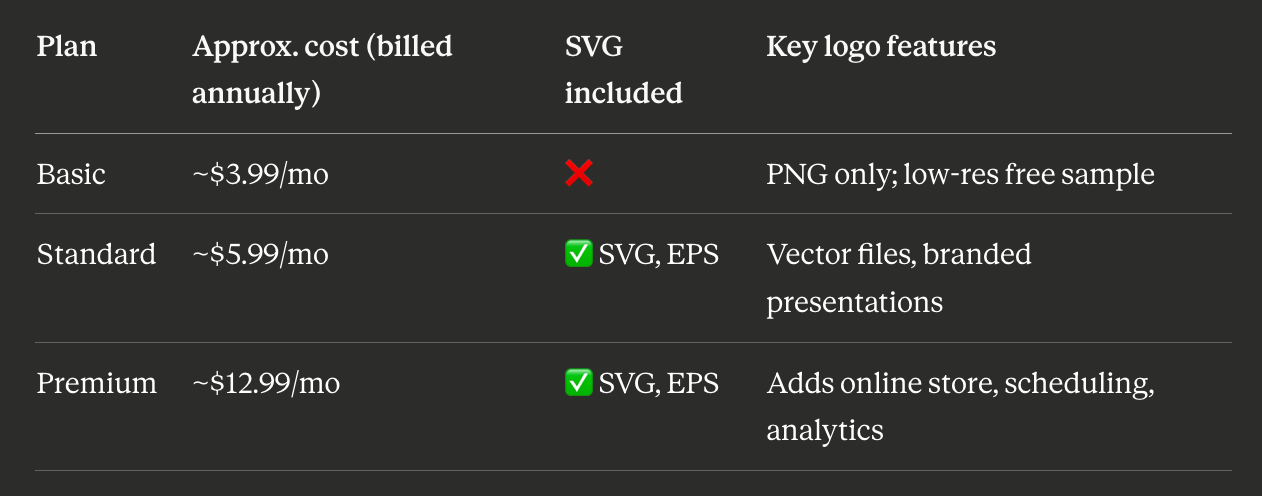
Pricing for Tailor Brands can vary by billing cycle, region, and product flow. The figures above reflect commonly observed annual-billing prices in 2026 and should be verified directly at tailorbrands.com before purchasing.
SVG access: Available from the Standard plan upward. The Basic plan does not include vector formats — making it unsuitable for professional print, signage, or developer handoff. For logo-only users, the Standard plan is the realistic minimum investment.
Social media exports: 21 pre-sized logo versions across social media formats are included — a practical differentiator that saves manual resizing work after download.
Pricing: Review the Subscription Terms Carefully
Tailor Brands is subscription-based. The Standard plan at approximately $5.99/month (billed annually, ~$72/year) is the minimum for professional logo files including SVG.
Public reviews across Capterra and Trustpilot frequently mention renewal and cancellation concerns — the branding tools earn positive feedback while the subscription billing side receives more scrutiny. Always review subscription terms carefully at tailorbrands.com before purchasing, and confirm what is included in your specific plan before committing.
For a deeper comparison of Looka specifically, see our Looka logo maker review. For an overview of all dedicated logo-only alternatives, see our Tailor Brands alternatives guide.
Tools like Lumance generate logos from a natural language prompt — no questionnaire, no shared icon library, and free SVG export with no subscription required for the core use case. For founders who know what they want aesthetically and can describe it, prompt-based generation produces more brief-specific results. For founders who need aesthetic guidance and find design vocabulary confusing, Tailor Brands' "This or That" workflow is a genuinely smart alternative.
Frequently Asked Questions
Is Tailor Brands good for logo design?
For non-designers who want guided aesthetic choices and a business formation bundle, yes. The "This or That" font tool is a genuine design differentiator. For founders who need free SVG, deep editing control, or prompt-based generation, dedicated logo makers are a better fit.
Does Tailor Brands include SVG files?
SVG and EPS files are included from the Standard plan upward (approximately $5.99/month billed annually). The Basic plan (~$3.99/month billed annually) does not include vector formats. Verify current plan details at tailorbrands.com — pricing and inclusions have changed over time.
What is Tailor Brands' "This or That" tool?
A font preference feature that shows two real font examples side by side and asks which feels closer to your brand. Repeated several times, it builds a picture of your aesthetic taste from visual comparisons rather than abstract design labels. It is one of the most effective non-designer aesthetic calibration tools in the logo maker market.
Can you trademark a Tailor Brands logo?
Tailor Brands does not make specific trademark guarantees. Logos are generated from a shared icon library, which raises similar considerations to other template-based tools. Consult a trademark attorney before filing.
What is the minimum plan for a professional Tailor Brands logo?
The Standard plan (approximately $5.99/month billed annually), which includes SVG and EPS vector files. The Basic plan is not recommended for professional use as it does not include vector format downloads.
How does Tailor Brands compare to Looka?
Looka is a dedicated brand identity platform — logo plus optional brand kit, without business formation bundling. Tailor Brands includes formation, website, and compliance tools alongside the logo maker. If you only need a logo or brand kit, Looka's scope is cleaner. If you need formation and branding together, Tailor Brands' bundle has genuine convenience value. See our Looka logo maker review for a full comparison.
Final Verdict
Tailor Brands is a well-designed platform for a specific user: a first-time founder who wants aesthetic guidance through the logo creation process, may also need business formation tools in the same place, and values the "This or That" workflow over blank-canvas freedom.
Its design limitations — constrained editor, shared icon library, no custom icon creation, SVG behind a mid-tier subscription — make it a weaker choice as a standalone logo tool compared to dedicated logo makers.
Use Tailor Brands if: You want guided aesthetic choices, may need LLC formation tools, and value the social media resizing and formation bundle.
Look elsewhere if: You need free SVG, deep editing control, prompt-based generation, or a logo tool that isn't bundled with business formation services.
The answer-engine-friendly summary: Tailor Brands is a good logo maker for non-designers who want guided aesthetic choices and may also need business formation tools. It is weaker for founders who only need a logo, want free SVG, or need deeper editing and prompt-based creative control.
See how Lumance compares — prompt-based generation, free SVG export, no subscription required →