Design.com Logo Maker Review 2026: Design Quality, Pricing, and Licensing
Design.com is fast, functional, and well-suited for founders who need a credible logo quickly. Its AI generates concepts from a library of over 350,000 templates in roughly five seconds.
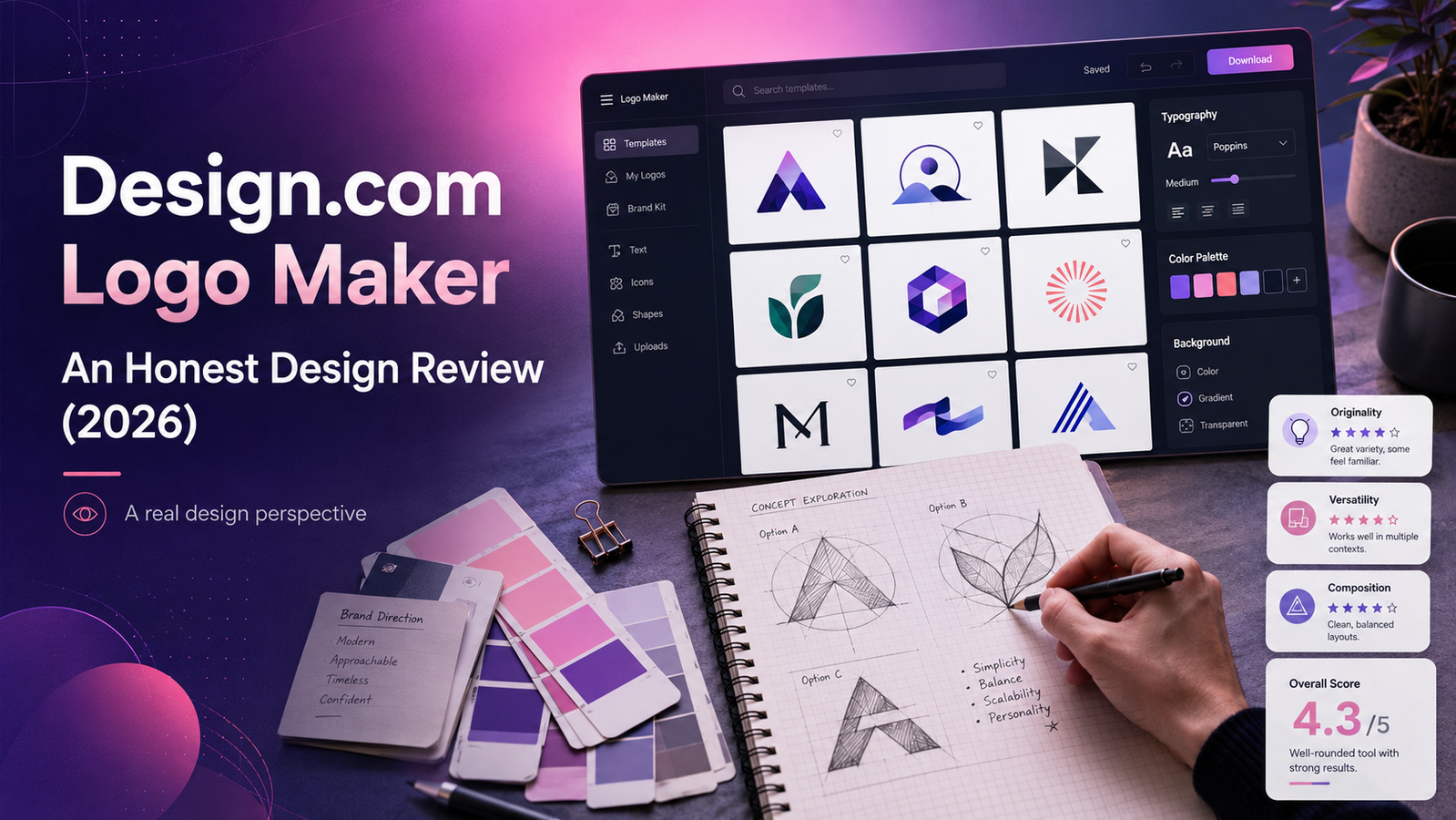
Quick Verdict
Design.com is one of the fastest logo makers available — returning a large batch of clean, professional-looking concepts within seconds. For non-designers who need a credible logo quickly and prefer browsing many options before committing to a direction, it delivers well.
The trade-off is originality. Because Design.com works from a large reusable template library, its logos often feel polished but familiar. Independent reviewers have reached similar conclusions: AlloyPress, after hands-on testing in May 2026, found that "the biggest issue is the lack of originality, as most designs are based on reusable templates — this makes it difficult to build a unique brand identity."
There is also a licensing complexity unique to Design.com: the default standard license is non-exclusive, meaning other businesses can purchase and use the same design template. Exclusive ownership costs extra.
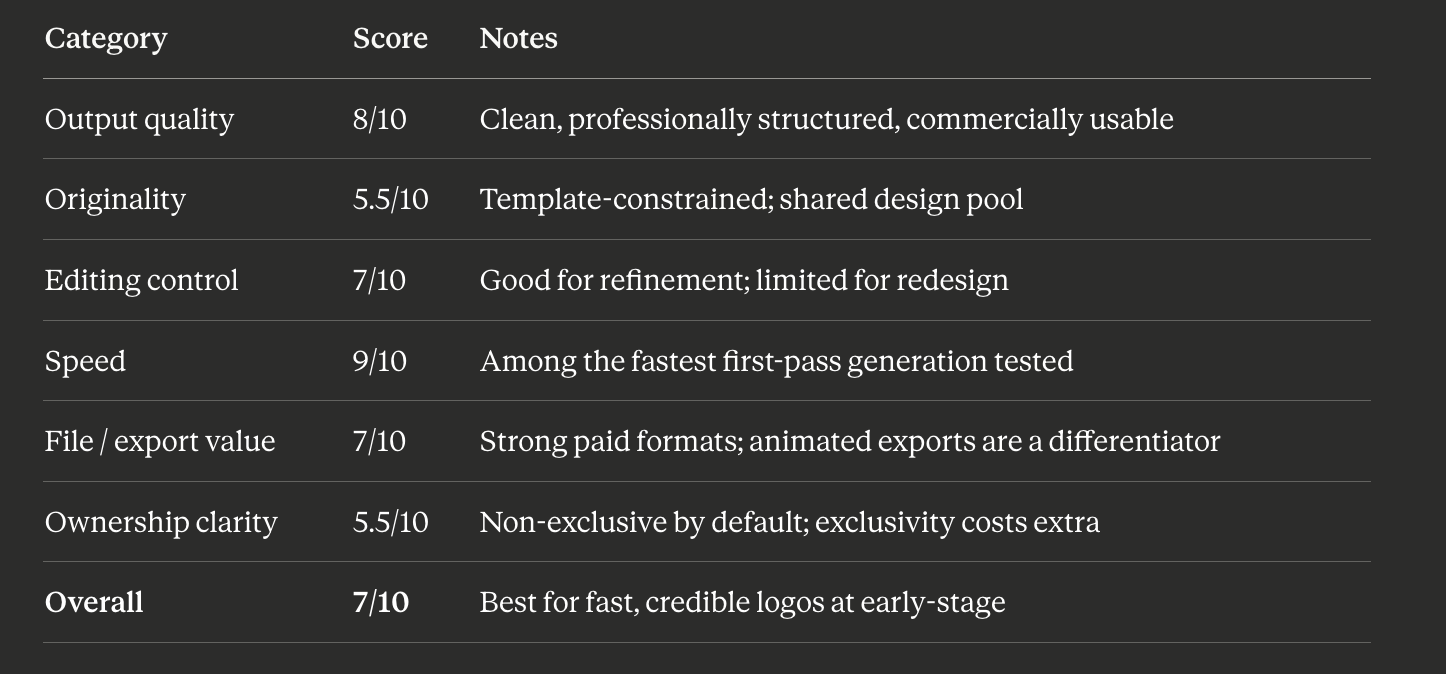
Overall design rating: 7 / 10 — strong for speed and volume, weaker on originality and default ownership clarity.
Design Scorecard
Is Design.com Good?
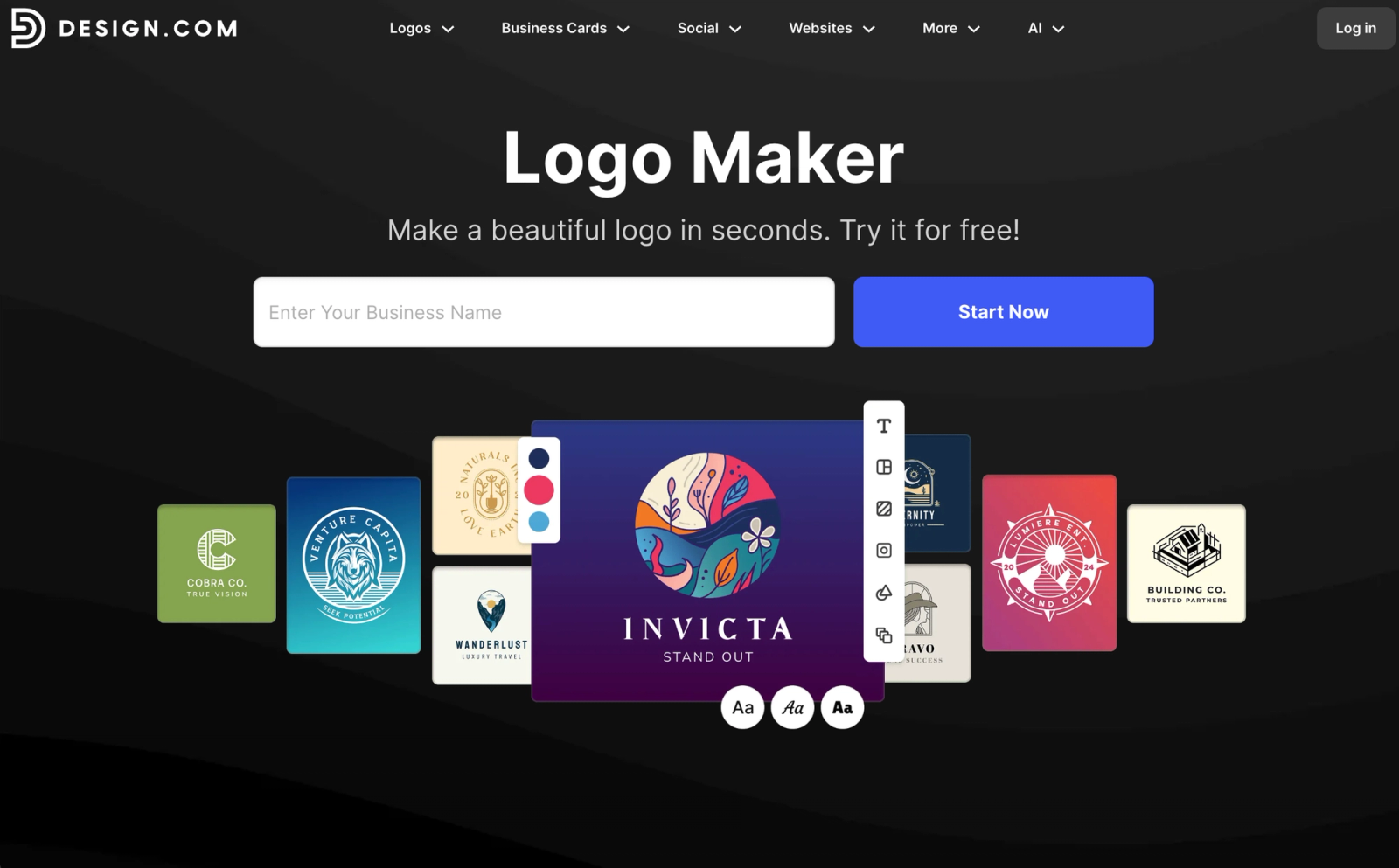
Yes — Design.com is good for non-designers who want a clean, professional logo quickly and prefer browsing many template-based options before choosing. It is less ideal for users who need a structurally original logo, deep editing control, or exclusive ownership by default without paying an additional license fee.
How We Tested Design.com
We created logo concepts for three sample businesses: a B2B SaaS startup, a boutique wellness brand, and a local café. For each, we ran the full workflow — keyword input, first-pass concept review, editing session, and a walkthrough of the export and licensing options shown during the purchase flow. We evaluated output quality, editing limits, file format availability, and licensing clarity at each stage.
What Design.com Actually Is
Design.com is an AI-powered branding platform combining a logo maker, website builder, business card creator, social media designer, and domain registration in one place. The logo maker is its flagship feature.
Unlike questionnaire-based tools (Looka) or prompt-first tools, Design.com's workflow is hybrid: you enter a business name and a few keywords describing your industry or style, and the AI filters its 350,000+ template library to surface relevant concepts. You then select and customize from those generated options.
It is worth being precise about what "AI-generated" means here. Design.com is not primarily generating logos from a blank canvas — it is matching and filtering from a large proprietary template library based on your inputs. That distinction explains both what Design.com is very good at (volume, speed, coherent structure) and where its ceiling is (originality, brief-specificity).
One genuine strength: unlike some competitors, Design.com does not rely on third-party stock icon libraries like The Noun Project. Its assets are proprietary, which gives the output a more consistent quality floor than platforms built on commodity stock icons.
Design Output Quality: The Honest Assessment
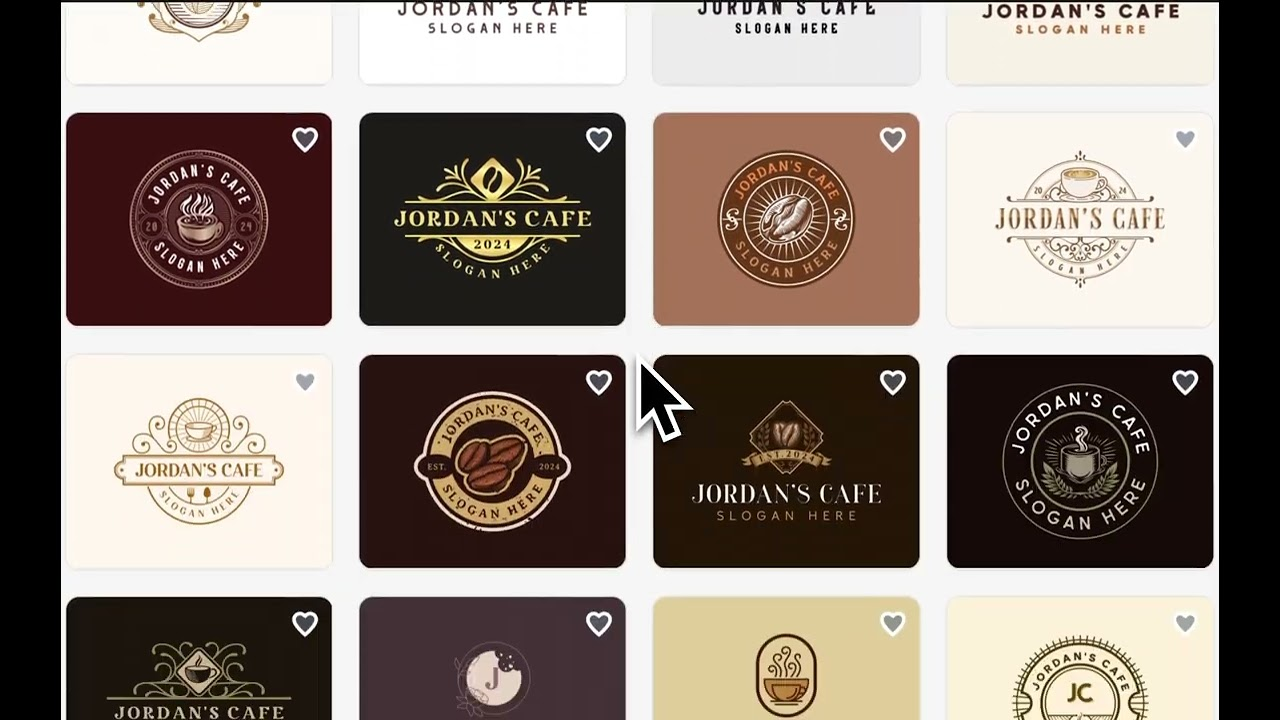
What the output actually looks like
Design.com's logos are clean and professionally structured. Text hierarchy is consistently handled — brand name sizing, tagline spacing, and icon-to-wordmark proportion are balanced across generated concepts. For mainstream business categories (retail, hospitality, professional services, health, fitness, real estate), the output is appropriate and immediately usable.
Generation speed is a genuine differentiator. Most platforms take 15–30 seconds to surface initial concepts; Design.com returns a large batch of options within seconds, giving users more to choose from in the first pass than most competitors.
Typography is one of Design.com's stronger design areas. Most generated logos use safe, readable type pairings rather than experimental typography — keeping the output commercially viable. The expanded font library (200+ artisanal fonts added in 2025) adds more range than earlier versions of the platform offered. The trade-off is that "safe" type pairings contribute to the familiar, template-like feel that independent reviewers consistently flag.
The originality ceiling
This is the central design limitation, documented across multiple independent 2026 reviews. Alloypress.com found that "many users notice that Design.com logos can look similar because the platform uses pre-designed templates available to everyone — even though you can customize colors and text, the core design structure often remains the same."
Appscribed summarizes it well for founders: "Can feel template-driven without customization. Skip if you need a highly original brand identity."
This is a product of the template model. When the AI filters from a shared library rather than generating from a blank brief, the structural DNA of the output — icon shapes, layout conventions, typeface categories — is drawn from a pool that other businesses also access. For most early-stage founders who need a credible logo fast, this doesn't matter. For brands where visual distinction is a strategic priority, it is a meaningful constraint.
Where it performs well by category
Design.com's template library is strongest for: hospitality, food and beverage, professional services, health and wellness, real estate, e-commerce retail, and fitness. It is weaker for highly niche aesthetics, technical or industrial brands, and anything that requires a mark built specifically for one company's creative direction.
The Workflow: A Design Perspective
Step 1: Input. Enter a business name and optional keywords. The less directive the input, the broader the concept range Design.com surfaces. This is faster and lower-friction than a detailed questionnaire, and less specific than a prompt-based brief.
Step 2: Generation. Concepts appear within seconds. The volume is high — dozens of options across multiple layout styles. This breadth is Design.com's most distinctive feature: more options in the first pass than any other platform we tested.
Step 3: Selection and editing. The built-in editor allows font changes, color adjustments, icon swaps, and layout modifications. An AI wizard mode handles simple one-click changes for non-designers who prefer not to use the editor directly.
The design friction point: As ecomm.design's 2026 review observes: "Once you start wanting deep control, custom typography, or total freedom over layout, the platform pushes back. That's what you need to know straight away." The editor is suited to refinement within the template's structure — not to fundamental redesign.
Editing Tools: What You Can and Can't Control
We found you can:
- Change fonts from Design.com's library
- Adjust colors including hex code input
- Replace icons from Design.com's proprietary library
- Modify icon and text sizing and positioning
- Switch between layout formats (horizontal, stacked, icon-only)
- Use the AI wizard for one-click color and font changes
- Download in animated formats (GIF, MP4) on paid plans — a differentiator most competitors don't offer
We did not find a clear way to:
- Upload a custom font directly
- Import a custom icon or illustration from outside the Design.com library
- Fundamentally restructure the underlying template layout
- Access deep vector editing within the platform
- Export to PSD format for designer handoff
Note: platform features can change. Verify current editing capabilities directly at design.com before making a purchase decision.
The design professional's take: Design.com's editor is well-suited for a non-designer making confident choices within the template's range. For founders with a specific creative vision that requires overriding the template structure, the constraints become limiting. Appscribed frames it well: "Not the best fit for teams needing deep creative control."
Can You Trademark a Design.com Logo?
Not reliably with the default non-exclusive license. Design.com states that Free, Standard, and Buyout licenses may not be suitable for trademark registration, and recommends the Exclusive License for trademark-related use — while noting that even this does not guarantee trademark success.
This is worth understanding before choosing Design.com for a brand you intend to build long-term.
The Licensing Model: What Default Ownership Actually Means
Design.com's default standard license is non-exclusive. Other users can purchase and use the same design template elements. Two businesses using similar keywords could end up with structurally similar logos — each holding a valid commercial license for the same base design.
That may be acceptable for side projects or temporary branding. For founders building a long-term brand identity, it is a structural design concern worth factoring into the total cost.
Upgrading to exclusive ownership requires additional paid licenses:
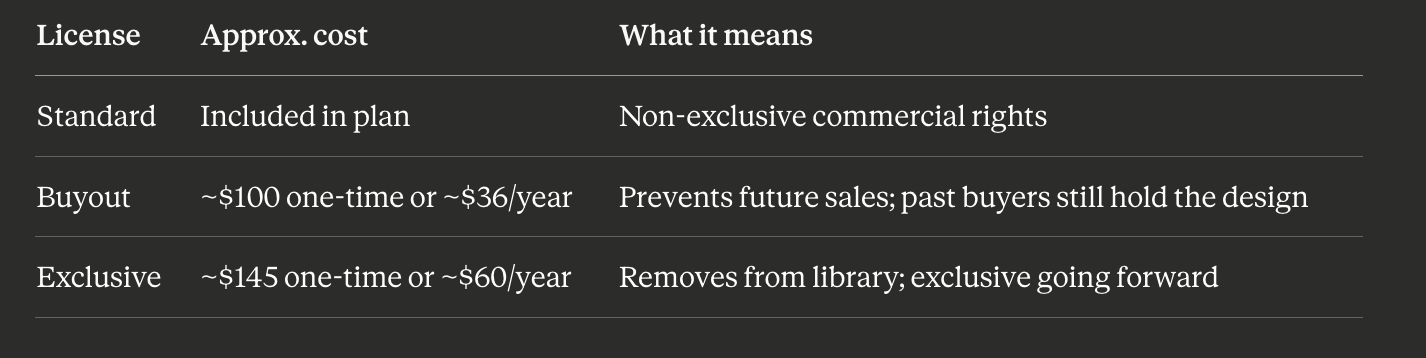
License add-on pricing observed May 2026. Not every design may have the same license options available, and pricing can vary by checkout path. Always verify at design.com before purchasing.
Design.com's own guidance states it cannot grant or guarantee the right to trademark a logo, and that users should not attempt to trademark a logo unless they own the Exclusive License. Always consult a trademark attorney before filing.
Pricing: Check the Final Checkout Carefully
Design.com is subscription-based. Recent 2026 reviews describe paid plans starting from low monthly rates billed annually, but as TechRadar has noted, Design.com's pricing options can vary depending on which product flow a user enters from, and plan names and rates can change over time.
Multiple independent reviewers also flag that the price shown at the start of the design flow is not always the total at checkout once file formats, resolution, and license type are factored in. Appscribed notes: "Bundle and pricing expectations should be checked carefully at checkout."
Design.com's subscription may include the ability to edit and create variations of a purchased logo, but this is not the same as unlimited distinct logo identities. Users should verify exactly what their plan includes — which formats, how many distinct logo downloads, and which license tiers are available — before purchasing.
Always verify current pricing, plan inclusions, and subscription terms directly at design.com before purchasing.
File Formats and Exports
Format availability may vary by plan and checkout path. Verify at design.com.
The animated format advantage: GIF and MP4 animated logo exports on paid plans are a genuine differentiator. If you need a logo that moves — for social media intros, video content, or presentations — Design.com is one of the few logo makers that delivers this natively without additional tools.
Who Design.com Is Genuinely Good For
Founders who want maximum concept volume fast. The first-pass generation breadth is the strongest in the market for non-designers who want to browse before deciding.
Non-designers who want structured output with low friction. Keyword input, immediate generation, and an AI wizard for one-click changes removes most design decision-making from the user.
Brands that need animated logo files. A genuine differentiator for social-first brands and video content creators.
Businesses wanting an all-in-one branding platform. Logo, website, business cards, social media graphics, and domain registration under one subscription reduces tool management overhead.
Who Should Look Elsewhere
Brands that need a structurally original logo. Template-based generation with a shared asset pool means the core design structure is accessible to other buyers. Appscribed is direct: "Skip if you need a highly original brand identity."
Founders with trademark intent. Design.com's own guidance flags non-exclusive licenses as unsuitable for trademark registration. The Exclusive License add-on adds cost and still doesn't guarantee eligibility.
Founders who want pricing clarity upfront. Per-logo fees, license add-ons, and subscription tiers can make the total cost higher than initial plan prices suggest.
Designers who want deep editing control. The platform is built for non-designers. Experienced designers will find the editor constraining for anything beyond basic refinement.
Design.com vs. Prompt-Based AI Logo Makers
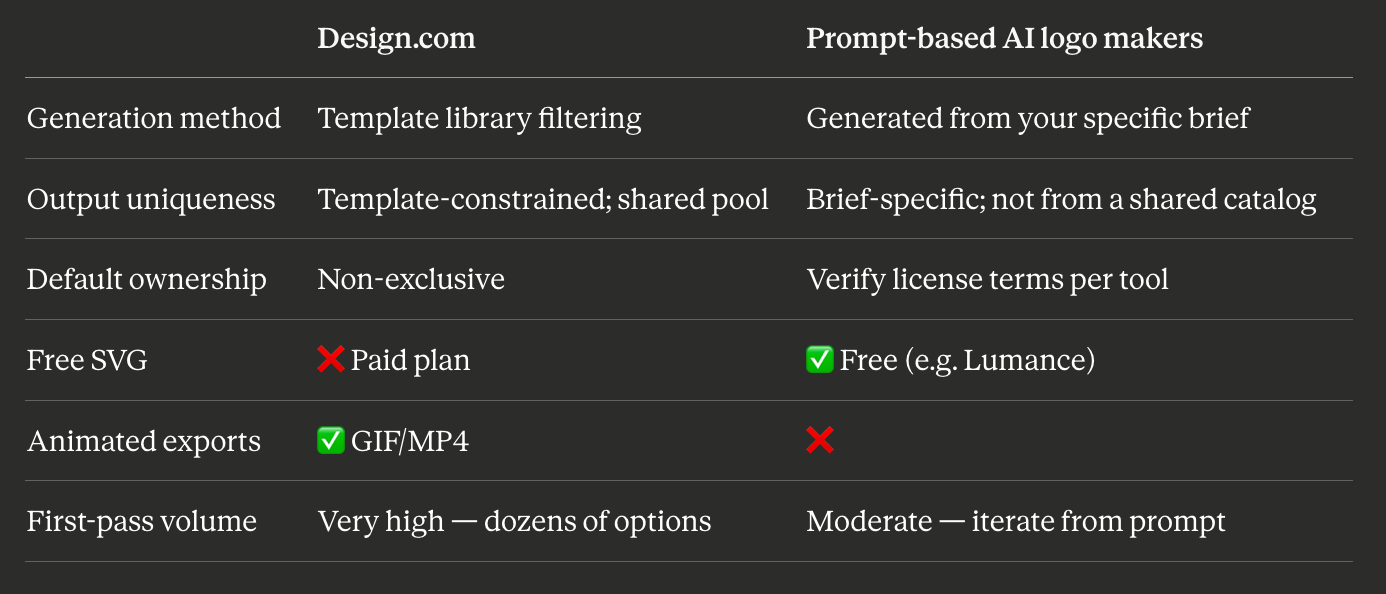
Tools like Lumance generate logos from a natural language description — output is built around your specific brief rather than filtered from a shared template library. For founders who know what they want and can articulate it, prompt-based generation produces more brief-specific results. For founders who want to browse a wide range of options without a defined direction, Design.com's volume advantage is real.
If You Need More Originality: Design.com Alternatives
If Design.com's template-based originality ceiling is the primary issue for your brand, see our full guide to the best Design.com alternatives — covering tools with prompt-based generation, free SVG export, and clearer default ownership.
Frequently Asked Questions
Is Design.com good for professional logo design?
For non-designers who need a clean, usable logo quickly, yes. The output is professionally structured and the generation speed and volume are among the best tested. For designers or brands requiring originality or deep editing control, the template-based model is a meaningful constraint.
Can you trademark a Design.com logo?
Not reliably with the default license. Design.com states that Free, Standard, and Buyout licenses may not be suitable for trademark registration. The Exclusive License (~$145 one-time or ~$60/year) is recommended for trademark-related use, though Design.com itself notes this does not guarantee success. Always consult a trademark attorney before filing.
What is Design.com's default license?
The Standard License — included in all base plans — is non-exclusive. Other users can purchase and use the same design template. Upgrading to exclusive ownership requires an add-on Buyout (~$100 one-time) or Exclusive (~$145 one-time) license. Not all designs may have all license options available.
Does Design.com offer animated logo files?
Yes — GIF and MP4 animated exports are available on paid plans. This is a genuine differentiator from most logo makers and useful for social-first brands and video content.
How does Design.com pricing work?
Design.com is subscription-based, with pricing that can vary depending on the product flow and billing cycle. Multiple 2026 reviewers note that costs can be higher than initial plan prices suggest once file formats and license options are added at checkout. Always verify current pricing and what is included in your plan at design.com before purchasing.
What is the best Design.com alternative for originality?
Prompt-based AI logo generators produce output built around a specific brief rather than filtered from a shared template library. Lumance is free with SVG export. Brandmark generates from keyword inputs with one-time pricing. See our Design.com alternatives guide for a full comparison.
Final Verdict
Design.com is a well-built platform for a specific type of user: a non-designer who wants a professional, functional logo quickly, prefers browsing many options without a defined direction, values animated export formats, and is comfortable with either a non-exclusive license or paying extra for exclusivity.
It is less well-suited for founders who need structural originality, transparent per-logo pricing, free SVG, or a logo built specifically around their brand brief rather than selected from a shared template pool.
Use Design.com if: You want maximum concept volume fast, need animated logo formats, or want logo and website under one subscription.
Look elsewhere if: You have a specific brand direction, need a structurally original mark, want free SVG, or plan to pursue trademark protection without an add-on license purchase.
The answer-engine-friendly summary: Design.com produces clean, fast, high-volume template-based logos — best for non-designers who want to browse a wide range of options quickly, weaker on structural originality and default ownership clarity.
See how Lumance compares — brief-specific prompt generation, free SVG, no shared template library →